A collection of over 1,000 2D vector stickers for the New Stickers application. Just download and import the XML files.
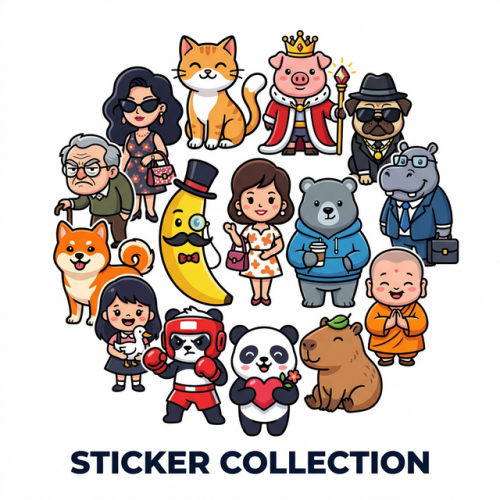
Bao: A cute little monk with a love for food and laziness, expressing a wide range of adorable emotions.
Capybara: The master of chill featuring relaxed, low-energy vibes and naturally humorous everyday moments.
DoughBoo: A cute little piece of dough showcasing various sports activities and energetic reactive slogans.
Gerry: A mishap-prone pony in a red scarf constantly finding himself in funny accidents and dramatic situations.
HippoHustle: A relatable office-worker hippo illustrating the typical daily grind, from deadlines to meetings.
IAZ: A cheerful pink pig with antennae enjoyng life, boba tea, and various tech-related reactions.
KinaPug: A classy pug wearing a monocle and bowtie, expressing dramatic emotions and wealthy lifestyle vibes.
Manu: A powerful muscular panda showcasing strength, romantic gestures, and even relatable daily habits.
MeeMee: Little miss MeeMee and her ducky bestie checking out the latest gossip on their phones!
Miss Petunia: Sassy, stylish, and sophisticated. Add a touch of glamour to your chats with MissPetunia and her fabulous high-fashion vibe.
MrBanana: Add a bunch of fun to your chats with MrBanana, featuring a hilarious range of silly antics and relatable, quirky expressions for every mood
MrGrumble: Express your inner grouch with MrGrumble—the charmingly irritable senior whose dramatic reactions say it all.
Poony: Cute, fierce, and funny. Poony the panda boxer is here to champ your chat game
Shiboo: The charming Shiba Inu! Follow his adorable daily life, from sweet romantic dates to funny relatable reactions
WooKong: Epic, funny, and uniquely charming. Wookong features the one-of-a-kind pig hero in a majestic yet hilarious tribute to the classic legend—perfect for every reaction
Zuzu: Meet Zuzu, the ginger cat with a thousand faces! From epic cosplays as Goku and Spiderman to mischievous daily pranks, this collection of 85 stickers covers every emotion and hilarious situation
Norbix: Think bigger with Norbix! A collection of 47 expressive stickers featuring the world's cutest pink brain. Because sometimes, your brain just says it better.